
Software built by one guy named Karl

Clean, lightweight utilities designed to make your life a little simpler and easier!

KITKARL SOFTWARE: Image Squisher
 WINDOWS, MAC, LINUX

Image Squisher: Your photo library, downsized.

Image Squisher shrinks, converts and resizes your whole photo library: iPhone HEIC and camera RAW to JPG, batch resizing, exact file sizes for email and upload limits. Quality you honestly can’t tell apart. Drop, squish, done.
Care about privacy? Strip all personal data from every photo!
Need a different format? Convert to any format you want, even to and from PDF!

See the difference. (You won't.)

A real photo, squished. Click either photo to zoom in close.

Original20.8 MB
Original photo, full quality
Squished
Squished photo
Click to pick your quality

Real files, real sizes, straight out of the app.

A real 4672 × 7008 photo, squished at every quality setting. Click either photo to zoom all the way in and try to spot the difference. You probably can’t and that’s the point!

 No ads · No account · Use for free

KITKARL SOFTWARE: Video Squisher
 WINDOWS, MAC, LINUX

Video Squisher: Save your hard drive space from large videos!

Video Squisher shrinks old phone clips, drone footage, and whole archives down to a fraction of their size — with quality you honestly can’t tell apart. No codec knowledge. No settings maze. Just drag, drop, and done.

See the difference. (You won't.)

937MB in -> 36.4MB out. Video looks the same!

A real unedited 4K phone video, squished. Click either frame to zoom in close.

Original video936.8 MB
Original video still frame, full quality
Squished video
Squished video still frame

Your browser can't play AV1 clips, so these are still frames from each one instead.

Click to pick your quality

Real files, real sizes, straight out of the app. The panes play a 12-second clip from the full 2-minute video; the sizes shown are the full files.

Make most videos 40–90% smaller while looking visually the same.

 No ads · No account · Use for free

KITKARL SOFTWARE: EdgePop
WINDOWS 10 & 11

EdgePop: The edge becomes the switcher.

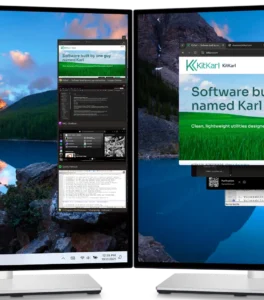
EdgePop is the multi-monitor switcher that lives at your screen edges. Park your cursor at the border between two monitors and every window on the other side appears — icons, titles, live thumbnails. Click one to jump straight there.

EdgePop, the free multi-monitor switcher by KitKarl

 No ads · No account · ~2 MB installer

KITKARL SOFTWARE: They F'd Up

They F'd Up: the tracker for all of Microsoft's mistakes.

Zune. Clippy. Windows ME. The update that un-licensed the Office you already paid for. All on the record, every entry dated, sourced, and measured in Vistas. See what broke, who it hit, and whether Microsoft fixed it or just stood by it. There’s a live counter for the days since the last one. Their longest quiet streak in five years barely outlasts a summer.

Copyright KitKarl 2026

Scroll to Top